Voice assistants are moving beyond setting timers and playing music — they are becoming workplace copilots that can retrieve knowledge, make decisions, and automate tasks. At Meetri, we wanted to explore what it would take to build such a system.
Imagine asking a simple question like “Show me the leave policy” or “Schedule a meeting with Rahul tomorrow” — and having a voice assistant instantly respond with the right information or take action. That’s what we set out to build with our AI voice assistant designed to be a workplace copilot.
It is not just a chatbot with a microphone; it is a carefully engineered system that combines data ingestion, embeddings, vector search, and natural language models to deliver fast, accurate, and context-aware answers. Here’s how it works.
The System Pipeline – Step by Step
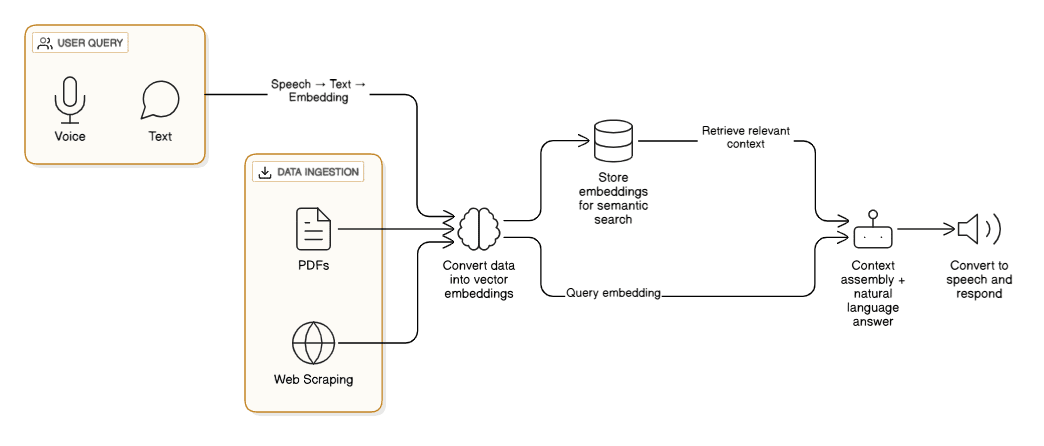
To make Meeva intelligent, we built a pipeline that feeds it company knowledge and enables it to respond in natural language:
- Data Ingestion – Gathering knowledge from:
- PDF Parsing: Policies, reports, and training material.
- Web Scraping: Internal portals and knowledge pages.
- Embedding Generation – Converting chunks of data into 384-dimensional embeddings using Hugging Face models.
- Vector Storage – Storing embeddings in a Vector Database for semantic similarity search.
- User Query – Converting speech to text, embedding the query, and searching the vector DB.
- Context Assembly – Feeding top results into an LLM for natural language response generation.
- Voice Output – Converting the response into natural-sounding speech.
How TTS Works in AI Voice Assistants
Text-to-Speech (TTS) is the final step in an AI voice assistant pipeline — it converts the generated text response from the LLM into natural-sounding audio. Modern TTS systems use deep learning models for speech synthesis to generate realistic human-like voices. Here’s the typical pipeline:
- Text Normalization: Converts raw text into a standard format. Examples: "123" → "one hundred twenty-three", "Dr." → "Doctor". This ensures consistent pronunciation.
- Phoneme Conversion (Grapheme-to-Phoneme / G2P): Converts written characters (graphemes) into phonemes — the smallest units of sound in speech. This step is crucial for handling irregular spellings.
- Acoustic Model: Neural networks such as Tacotron 2 or FastSpeech predict a mel-spectrogram (a frequency vs. time representation of speech). This is also called the acoustic feature generation stage.
- Neural Vocoder: A model such as HiFi-GAN, WaveGlow, or WaveRNN converts the spectrogram into an actual audio waveform. This step is computationally heavy and often benefits from GPU acceleration.
- Playback / Streaming: The synthesized audio is either streamed in real-time or played back after generation, completing the speech synthesis pipeline.
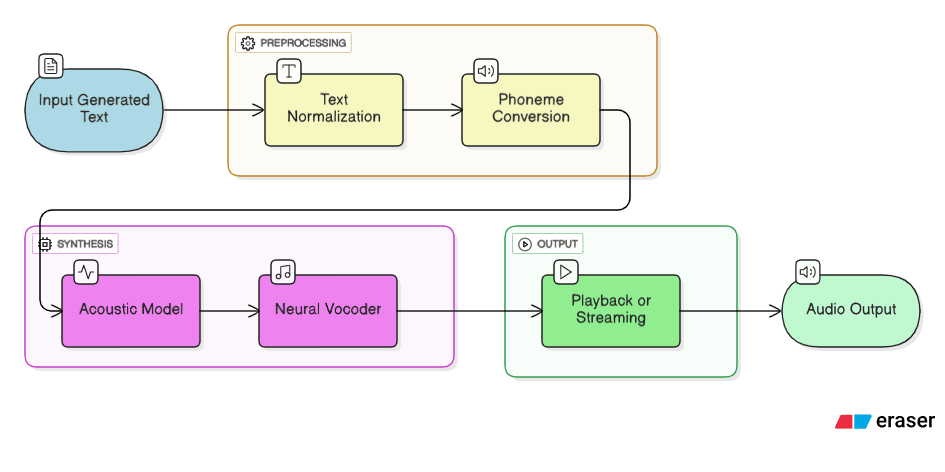
This pipeline ensures that the output speech is natural, clear, and prosodically correct (right pitch, rhythm, and intonation) — a major leap forward compared to the robotic voices of early TTS systems.
Our Journey with TTS Models
We experimented with multiple TTS models and APIs, evaluating them on key metrics like latency, naturalness, resource utilization, and cost.
- ElevenLabs: Produced the most human-like, emotionally expressive speech, with natural prosody. However, being a paid API, it could become expensive for large-scale real-time usage.
- Bark AI (by Suno, hosted on Hugging Face): Generated expressive and rich speech but was computationally intensive. On CPU, short text synthesis took ~40 seconds; using an NVIDIA T4 GPU reduced it to ~20 seconds, but still not ideal for a conversational assistant where sub-second latency is preferred.
- Coqui TTS: Open-source, customizable, and CPU-friendly. While functional, it had a slightly robotic tone compared to commercial models.
- Google TTS (Current Solution): Offers fast, clear, natural-sounding voices with low inference latency and runs smoothly on CPU — making it perfect for production without requiring expensive GPU infrastructure.
These optimizations allowed us to build a production-ready, low-latency, scalable AI voice assistant that delivers a near-human experience.
Challenges We Faced and How We Solved Them
Building a production-ready AI voice assistant like Meeva was not just about connecting APIs — it involved solving real engineering problems. Here are some of the major challenges we faced and how we overcame them:
- Retrieving Accurate Data from Vector DB: In the early stages, we struggled with retrieving the correct data from the vector database. Sometimes irrelevant chunks were ranked higher than relevant ones. We solved this by reordering and fine-tuning the Top-N retrieval logic to ensure the most relevant information appears first.
-
Finding the Ideal Chunk Size: Storing data
in embeddings requires splitting large documents into
chunks. If chunks are too small, context is lost; if too
big, retrieval becomes less precise. We experimented with
multiple chunking strategies:
- Sentence-based chunking: Chunks of 100–500 characters, preserving sentence structure.
- Paragraph-based chunking: Up to 600 characters, maintaining logical paragraph boundaries.
- Section-based chunking: Using headers and list items to keep meaningful sections together.
- Hybrid approach: Combining sections, paragraphs, and sentences for complex documents. Implemented with SentenceTransformer embeddings and PostgreSQL for vector search.
- Filtering User Intent: Understanding when a user is just greeting versus asking a specific question was tricky. We defined a dictionary of common intents and created embeddings for them. This allowed the system to detect intent, respond naturally, and stop the flow when appropriate — for example, giving a friendly greeting instead of unnecessarily fetching context.
- API Token Usage and Cost Optimization: Initially, our API keys were burning through tokens quickly due to large prompts. We optimized this by reducing token size, trimming unnecessary text, and using prompt engineering techniques to make every token count.
- Implementing Caching: To reduce API calls and speed up responses, we introduced a Redis caching layer. This allows us to serve previously answered queries instantly if the same question is asked again.
- Sentiment Analysis: Meeva is context-aware — understanding if the user is frustrated, confused, or happy helps improve response tone and overall experience.
- Generating Human-like Voice: Achieving realistic voice output was one of the hardest problems. We tested multiple TTS models like Bark AI. On CPU, generating short responses took ~40 seconds — too slow for real-time conversations. Switching to GPU acceleration on NVIDIA T4 reduced this to ~20 seconds, improving usability.
- Current Production Setup: For stability and lower maintenance, we now use Google Cloud Text-to-Speech on CPU. It ensures reliable latency and high-quality output without constant GPU management.
Continuous Improvement: Over time, we tuned the system with new words, edge cases, and special scenarios. Integrating AI is a continuous improvement process — the assistant learns from usage patterns and becomes smarter at handling greetings, intent detection, and unusual queries.
Handling Irrelevant Queries: When users ask off-topic or irrelevant questions, the assistant gracefully redirects them back to the main context. It can provide helpful pointers or encourage users to explore our services further, maintaining engagement while keeping interactions productive.
Key Learning: Building an AI voice assistant is not just a plug-and-play task. It requires continuous experimentation, optimization, and balancing accuracy, cost, and performance. Understanding user intent, providing natural conversational responses, and continuously improving the system are all critical for success.
Why We Use Vector Databases
Traditional search engines rely on keywords — they only work if you use the exact words present in the document. Vector search, however, works with semantic meaning, letting Meeva understand your intent and return the most relevant results.
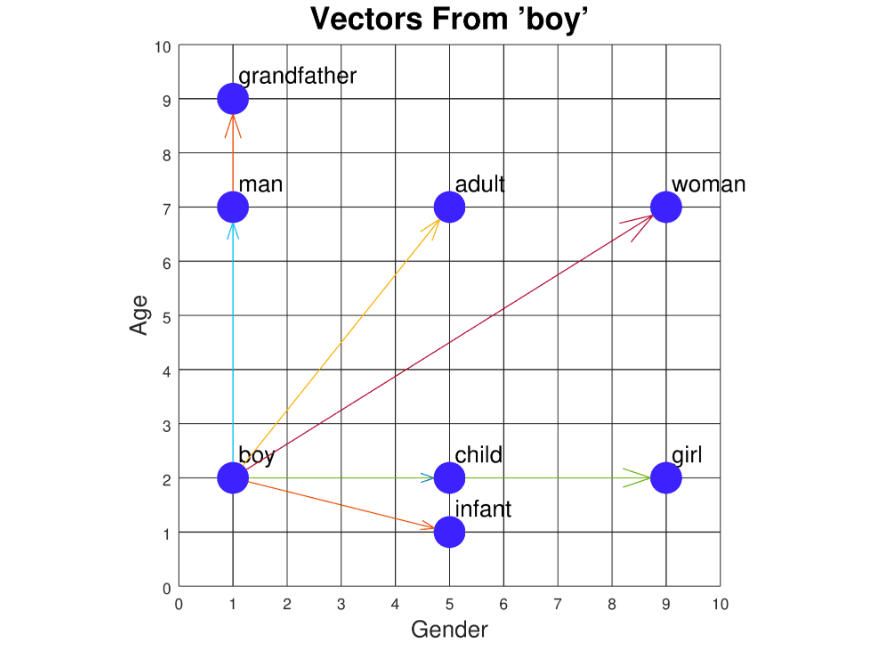
How Vector DB Works: When we convert text into embeddings, we get high-dimensional numerical vectors that capture the semantic meaning of the content. These vectors are stored in a specialized database that allows fast similarity search. When a user query comes in, it is also converted into a vector, and the database finds the items that are closest in meaning, not just by keyword match.
Cosine Similarity: Most vector databases use cosine similarity to measure how similar two vectors are. Cosine similarity calculates the cosine of the angle between two vectors. The smaller the angle, the more similar the query vector is to an item vector. The formula is:
cosine_similarity(A, B) = (A · B) / (||A|| * ||B||)
Where:
- A · B is the dot product of the two vectors.
- ||A|| and ||B|| are the magnitudes (lengths) of vectors A and B.
Example: If a query vector represents the word "boy" and an item vector also represents "boy," the angle between them is 0° and the cosine similarity score is 1, indicating perfect similarity. If the item vector represents "tennis," which is unrelated, the angle approaches 180° and the similarity score approaches 0, indicating low or no similarity.
During retrieval, the vector database computes the cosine similarity between the query vector and all item vectors, ranks them, and returns the top matches. Items with the highest cosine similarity are considered the most relevant to the query, enabling semantic search that understands meaning instead of just matching keywords.
Why AI Voice Assistants Are the Future

- Instant Answers: Traditional search methods require employees to manually browse through multiple documents, intranet pages, or chat threads to find information. AI voice assistants like Meeva eliminate this inefficiency by providing immediate, context-aware responses. By converting natural language queries into embeddings and performing vector-based semantic search, the assistant quickly retrieves the most relevant answers, saving valuable time and reducing cognitive load.
- Automation: Beyond answering questions, voice assistants can take actions on behalf of users. For example, scheduling meetings, setting reminders, or triggering workflows can all be performed hands-free. This level of automation not only improves productivity but also reduces human error in repetitive tasks, allowing employees to focus on higher-value work.
- Knowledge Democratization: Access to critical company knowledge is no longer restricted to a few individuals. AI assistants make information universally available across teams, departments, and roles. This ensures that everyone—from new hires to senior staff—can get the same accurate, up-to-date answers, promoting consistency in decision-making and reducing bottlenecks caused by information silos.
- Future-Ready: As organizations become more global, supporting multiple languages is essential. Modern AI voice assistants can be extended to handle multilingual queries, enabling employees to interact in their preferred language. Additionally, advancements in AI and LLMs mean the assistant can evolve to handle more complex interactions, personalized recommendations, and integration with emerging enterprise tools.
Business Impact

Integrating a voice AI assistant into business operations can significantly enhance efficiency and decision-making. Employees can access critical information instantly without navigating multiple systems or documents, reducing the time spent on routine searches by up to 30-40%. This allows teams to focus on strategic initiatives, driving productivity across departments.
Voice assistants can automate repetitive tasks such as scheduling meetings, sending reminders, generating reports, and managing approvals. This not only reduces manual errors but also speeds up workflows, enabling faster response times and improving overall operational efficiency.
By providing a centralized, voice-accessible knowledge base, businesses can democratize information access. Every employee, regardless of role or seniority, can retrieve accurate and up-to-date information in real time, reducing bottlenecks caused by knowledge silos and improving collaboration across teams.
In addition, adopting voice AI positions businesses for the future: multilingual support allows global teams to interact in their preferred language, and AI-driven analytics can provide insights into employee behavior, frequently asked questions, and workflow optimizations. Overall, introducing voice assistants can lead to cost savings, higher employee satisfaction, faster onboarding, and a more agile organization capable of responding quickly to changing business needs.
Best Practices for Building an AI Voice Assistant
1. Define Clear Objectives
-
Identify the primary use cases: customer support, internal knowledge retrieval, personal assistant, etc.
-
Decide on the scope and limits of what the assistant can do.
-
Document success metrics (response accuracy, latency, user satisfaction).
2. Data Strategy
-
High-quality, clean data is critical: structured documents, internal policies, FAQs, emails, chat logs.
-
Preprocess text: remove noise, normalize abbreviations, handle numbers, dates, and special characters.
-
Chunk content for embeddings to balance context and retrieval efficiency.
-
Keep data up-to-date and plan for continuous ingestion.
3. Use Semantic Search
-
Convert text into vector embeddings rather than relying solely on keywords.
-
Use Vector Databases for fast similarity search.
-
Implement Top-N retrieval with ranking to ensure the most relevant results appear first.
4. Choose the Right LLM
-
Select a language model that fits your use case: GPT-4 for high accuracy, smaller LLMs for internal or cost-sensitive apps.
-
Use prompt engineering to guide outputs and maintain context.
-
Limit input length to optimize latency and token cost.
5. Speech-to-Text (STT) Best Practices
-
Use robust STT models that handle multiple accents, background noise, and casual speech.
-
Normalize audio inputs to improve transcription accuracy.
-
Test latency for real-time applications; aim for sub-second response.
6. Text-to-Speech (TTS) Best Practices
-
Choose a natural-sounding voice that matches your brand or persona.
-
Choose the right TTS model:
- OpenAI TTS: great quality
- Google TTS: very reliable
- Coqui TTS: open-source, moderate quality
-
Optimize for latency; use GPU acceleration if available for high-quality models.
-
Ensure prosody (pitch, rhythm, intonation) is natural.
7. Multi-Turn Conversation Management
-
Maintain context across multiple interactions.
-
Store session history to handle follow-up questions accurately.
-
Use embeddings or memory layers for semantic recall of past conversations.
8. Performance & Optimization
-
Introduce caching (Redis or similar) to reduce repeated API calls.
-
Optimize LLM prompts and token usage to reduce cost.
-
Implement GPU resource management for heavy TTS or LLM tasks.
-
Load-balance requests if supporting multiple concurrent users.
9. User Experience
-
Make responses concise, clear, and context-aware.
-
Provide fallback options when the assistant doesn’t understand.
-
Use multimodal feedback: text, audio, or visual cards if possible.
-
Test the assistant with real users for usability and clarity.
10. Monitoring & Analytics
-
Track response accuracy, latency, user satisfaction, and errors.
-
Analyze frequent queries to optimize knowledge coverage.
-
Continuously fine-tune embeddings, prompts, and TTS models for improvement.
11. Scalability & Future-Proofing
-
Design for modular architecture: separate STT, LLM, TTS, and database layers.
-
Plan for multilingual support and expanding capabilities.
-
Keep the system extensible for new integrations like workflow automation or analytics.
Summary: A great AI voice assistant balances accuracy, naturalness, speed, and scalability. It’s not just about speech output; the real impact comes from semantic understanding, context awareness, and seamless integration with workflows.
Tech Stack and Why We Chose It
- Python & FastAPI: Python is ideal for AI/ML integration, while FastAPI provides a lightweight, high-performance API backend for serving requests quickly.
- React: For building a responsive and interactive frontend where users can interact with Meeva seamlessly.
- Vector DB: Enables semantic search on embeddings, making information retrieval fast and context-aware.
- OpenAI LLM: Powers natural language understanding and response generation, summarizing complex information into human-readable answers.
Conclusion
Meeva represents the future of workplace interaction — voice-driven, intelligent, and always available. By combining vector search, embeddings, and LLMs, it is shaping a new way for businesses to access knowledge, automate routine tasks, and make faster, more informed decisions.
Beyond providing instant answers, AI voice assistants like Meeva can streamline workflows, reduce operational inefficiencies, and democratize information across organizations. The integration of semantic search and natural language understanding ensures employees receive accurate, context-aware responses every time, fostering consistency and productivity.
Implementing such technology also prepares businesses for the future: multilingual support, AI-driven analytics, and scalable deployment make it adaptable to global teams and evolving enterprise needs. Ultimately, voice AI assistants are not just a tool — they are a strategic enabler, enhancing collaboration, accelerating knowledge access, and driving measurable business impact.
Read more blogs here.